
A SwiftUI Spacer Extension
March 25, 2020
As I write more SwiftUI, I am finding (or creating) new ways to help me accomplish pixel perfect parity with my designs. What do I mean?
Imagine you have a design for a user’s avatar, and right underneath their avatar is their username—exactly 10pt away.
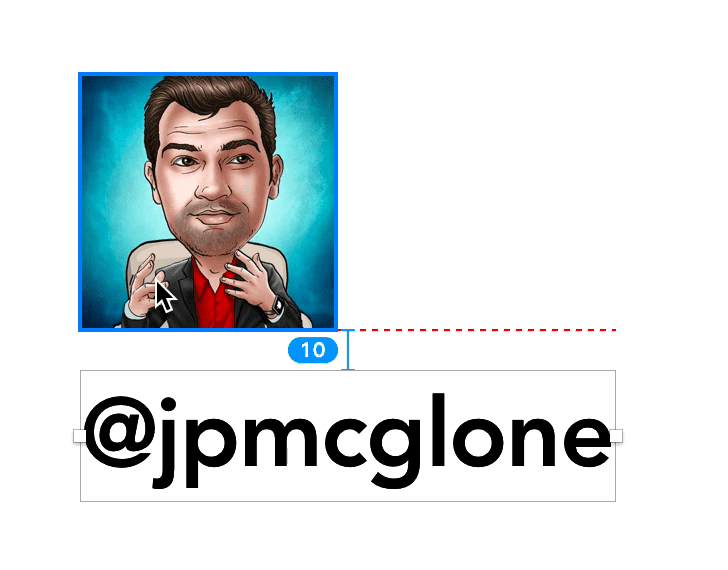
One way I’ve seen people do this in SwiftUI is something like this:
VStack {
  Image(avatarImage)
    .padding(10, .bottom)
  Text(username)
}
I don’t like this because it is saying that the view Image has a padding under it of 10pt. Technically, this same visual effect can also be accomplished like this:
VStack {
  Image(avatarImage)
  Text(username)
    .padding(10, .top)
}
Which, again, says something different then what is indicated in the design.
Some people will force a frame on a Spacer like this:
VStack {
  Image(avatarImage)
  Spacer()
    .frame(height: 10)
  Text(username)
}
I think that’s too verbose and the Spacer API should have something cleaner.
Well, now it does! I extended Spacer to work (almost) precisely this way.
Here’s the extension:
public extension Spacer {
  static func exactly(_ value: CGFloat) -> some View {
    Spacer()
      .frame(
        width: value,
        height: value
    )
  }

  static func idealOrLess(_ value: CGFloat) -> some View {
    Spacer()
      .frame(
        idealWidth: value,
        maxWidth: value,
        idealHeight: value,
        maxHeight: value
    )
  }

  static func idealOrMore(_ value: CGFloat) -> some View {
    Spacer()
      .frame(
        minWidth: value,
        idealWidth: value,
        minHeight: value,
        idealHeight: value
    )
  }
}
And are examples of the extension being used
VStack {
  Image(avatarImage)

  // The spacing between `Image` and `Text` is `exactly` 10
  Spacer.exactly(10)

  Text(username)
}
VStack {
Image(avatarImage)
// The spacing between `Image` and `Text` is `exactly` 10 (or less if it can't fit)
Spacer.idealOrLess(10)
Text(username)
}This reads a whole lot better.
Please give my extention a try and tell me what you think on Twitter! @SwiftGuild