
Combine Introduction
May 17, 2020
Build a Rock, Paper, Scissors Game With SwiftUI and Combine.
Reactive Programming
Introduction
Combine is Apple’s version of functional reactive programming. According to Apple, it is a declarative Swift API for processing values over time. The functional reactive paradigm is a combination of functional programming with reactive programming.
In functional programming, everything is modeled as a function. When using the paradigm, the program avoids changing the state of the program or mutating data. This paradigm is combined with the reactive paradigm. Reactive programming enables the handling of asynchronous data streams and event streams. For this reason, it works really well when working with UI, such as keyboard inputs or button taps.
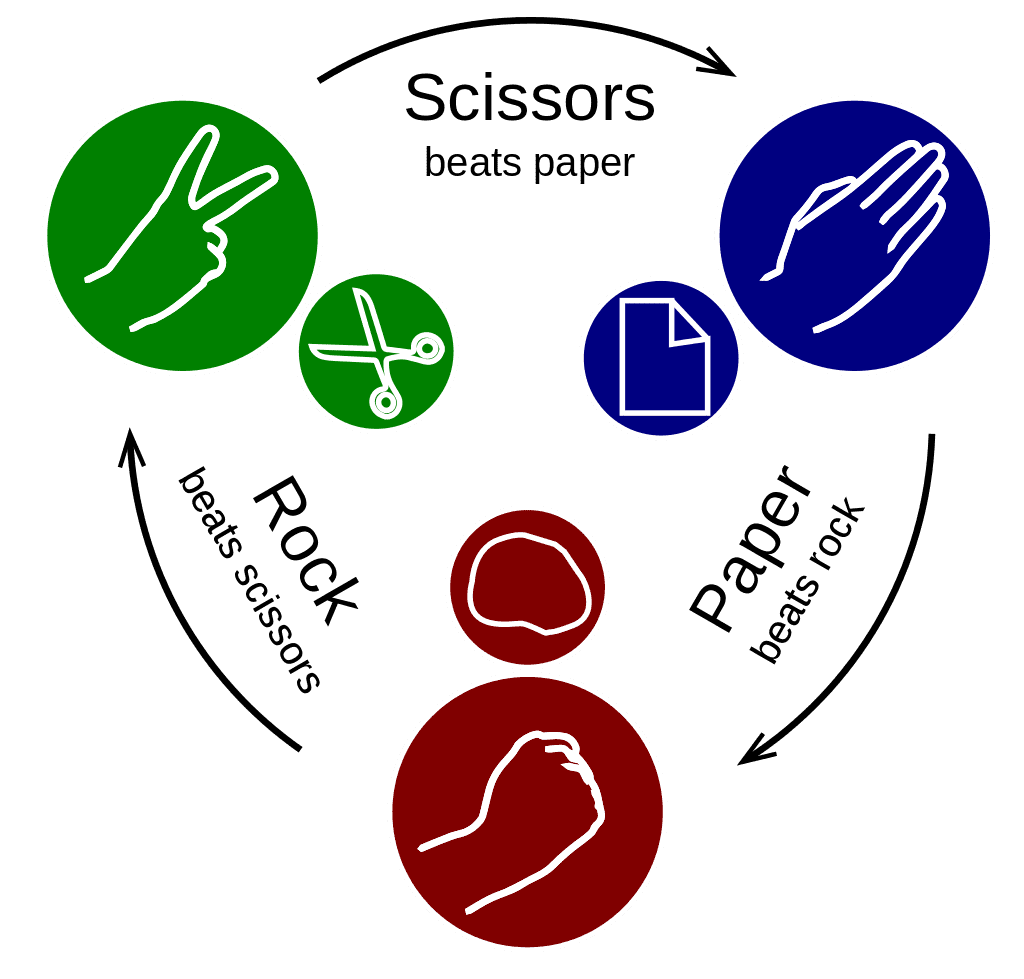
Combining the two creates a programming paradigm in which events or asynchronous calls are handled with functions. This is my first attempt to use Combine or any sort of functional reactive programming. I will make a basic Roshambo (Rock, Paper, Scissors) game.
Publisher
A publisher is the provider of data. In this mini-app, the first publisher is going to be the input of user selections. I am going to publish the events as they come in from the user. When the user opens the app, we will offer them three options: Water, Fire, and Grass. Fire beats grass. Grass beats Water. Water beats Fire.
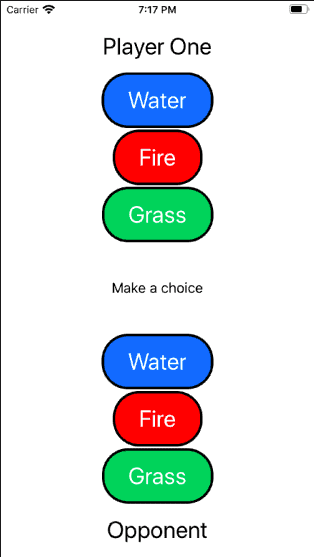
All the code for the mini-app of the Roshambo can be found in my
GitHub repo. The
ContentView class has an EnvironmentObject called App that I’m using to manage
the Combine logic. When I finish with this tutorial, the ContentView will be:
struct ContentView: View {
  @EnvironmentObject var app: App
  let playerOne = "Player One"
  let playerTwo = "Opponent"
  var body: some View {
    VStack {
      Spacer()
      Text(playerOne)
        .font(.title)
        .padding()
      ChooseElementView(selectedElement: $app.user.element)
        .disabled(app.winner != nil)
        .opacity(app.user.element != Element.none ? 0.5 : 1)
      Text(app.user.element == Element.none ? "" : "Selected \(app.user.element.title)")
        .padding()
      control
      Text(app.opponent.element == Element.none ? "" : "Selected \(app.opponent.element.title)")
        .padding()
      ChooseElementView(selectedElement: $app.opponent.element)
        .disabled(true)
        .opacity(app.opponent.element != Element.none ? 0.5 : 1)
      Text(playerTwo)
        .font(.title)
        .padding()
      Spacer()
  }
...
}
The App object is instantiated in the scene function within the SceneDelegate
and set as the environment object. It could not be any easier to create a publisher
when using the ObservableObject protocol. The only needed addition is a simple
annotation, @Published. Here is the first publisher:
class App: ObservableObject {
  @Published var user: Player
}
Now, any time the Player object, user, changes it will provide the updated
data. The ChooseElementView holds the buttons for the user to be able to select
an option.
struct ChooseElementView: View {
  @Binding var selectedElement: Element
  var body: some View {
    VStack(spacing: 5) {
      ForEach(Element.allItems, id: \.self) { element in
        RoshamboButton(element: element) {
          self.selectedElement = element
        }
      }
    }
  }
}
When one of the Roshambo buttons is pressed, it will update the element in the
Player object. This is because there is a binding between the selectedElement
in ChooseElementView which is instantiated when creating the element view:
ChooseElementView(selectedElement: $app.user.element)
The Player object is another simple ObservableObject which has a single
published variable.
class Player: ObservableObject {
  @Published var element = Element.none
}
The ObservableObject
protocol is a really powerful concept within SwiftUI. It makes creating a
publisher easy. The @Published annotation
is built into Combine. The publisher will trigger any time the property is
changed. The output type of the publisher is inferred from the property’s type.
In this case, the publisher type is <Element, Never>, which means the data type
is Element and there is no failure.
Subscriber
There is not much value in a publisher without a subscriber. The subscriber requests and receives data from the publisher. Until a publisher has a subscription request, it will not send any data. In order for the subscriber to request data from a publisher, the input type of the subscriber must match the output type of the publisher.
In my Roshambo mini-app, the opponent, CopyCatPlayer, is really annoying to play against. She
always waits to see what we do and makes the same choice! So the game result is always a tie.
This will be implemented by the CopyCatPlayer subscribing to the publisher. When the publisher
sends a new value, the other player will listen, wait a short period of time, and make the same
selection.
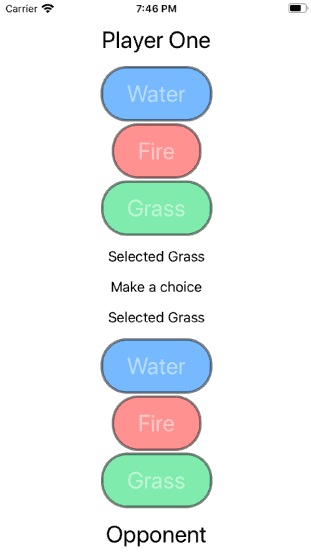
The CopyCatPlayer will be initialized with a publisher. This will cause the CopyCatPlayer
to update the selected Element when the user makes a selection.
class CopyCatPlayer: Player {
  private var cancellableSet: Set<AnyCancellable> = []
  init(opponentElement: AnyPublisher<Element, Never>) {
  let _ = opponentElement
            .assign(to: \.element, on: self)
            .store(in: &cancellableSet)
  }
}
Assign
is the subscriber. It uses the publisher and sets the published value to its own element variable
as soon as the opponent makes a selection. The reference is stored in the cancellableSet so the
subscriber will operate the full lifetime of the CopyCatPlayer.
Then the opponent is added to the App.swift class. The opponent is also published so
ContentView can update.
class App: ObservableObject {
  @Published var user: Player
  @Published var opponent: CopyCatPlayer! = nil
  init() {
    self.user = Player()
    self.opponent = CopyCatPlayer(opponentElement: user.$element.eraseToAnyPublisher())
  }
}
When the CopyCatPlayer is instantiated, the publisher is using the
eraseToAnyPublisher
function to provide a cleaner type. This can be done on any publisher. It allows the subscriber
to maintain abstraction from the underlying implementation.
There is now a CopyCatPlayer who will mimic the user’s selection, which is accomplished using
the assign
subscriber. In order to have the opponent have a delay before copying, I will need to introduce
a new concept: operators.
Operator
Operators are arguably one of the most important elements of Combine. They are intermediaries between publishers and subscribers. Operators can serve many purposes, including, but not limited to, changing the timing of events, transforming data, filtering, or even combining multiple publishers into a single data source.
The first operator I’m going to look at will change the timing of the CopyCatPlayer. This will
make the selection of the CopyCatPlayer delay by 200 milliseconds. In order to accomplish this,
there are two operators needed: debounce
and receive.
class CopyCatPlayer: Player {
  private var cancellableSet: Set<AnyCancellable> = []
  init(opponentElement: AnyPublisher<Element, Never>) {
    let _ = opponentElement
      .debounce(for: .milliseconds(200), scheduler: RunLoop.main)
      .receive(on: RunLoop.main)
      .assign(to: \.element, on: self)
      .store(in: &cancellableSet)
    }
  }
The debounce operator is used to delay the event. It takes two parameters: the amount of time
to wait and the scheduler on which the operator will deliver the events. The receive operator
is used to receive the event on the specified scheduler. It is easy to imagine how the two
operators are often used together.
To show an even more powerful way to use operators, we are going to create a new object, Game,
to subscribe to our player’s elements, in order to calculate the result of the Roshambo game.
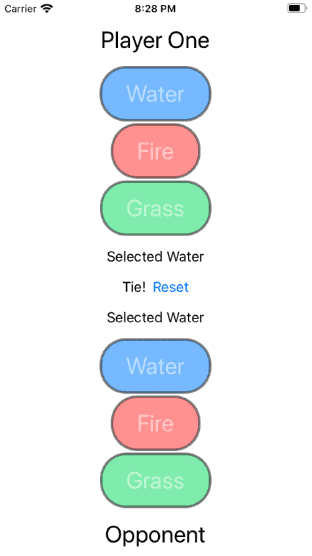
The Winner enum has three options. The winner could be player one (our user), player two
(the opponent), or neither (a tie).
enum Winner {
  case one, two, neither
}
The Game object will publish the Winner so our ContentView can tell the user who won the
game. To calculate the Winner, it will be initialized with two publishers, one for each player.
init(playerOneElement: AnyPublisher<Element, Never>,
     playerTwoElement: AnyPublisher<Element, Never>) {
  let _ = Publishers
    .CombineLatest(playerOneElement, playerTwoElement)
    .map { self.getWinner(elementOne: $0, elementTwo: $1)}
    .assign(to: \.winner, on: self)
    .store(in: &cancellableSet)
}
The two publishers are combined using an operator called
CombineLatest,
which will take the latest two elements from each publisher. So the input is two Element
objects, but the operator transforms the data type to a tuple of elements — (Element, Element).
Then a new operator familiar to most people is used, map.
The map operator uses the closure to transform the data type from (Element, Element) to
Winner?. This is the function used in the closure:
func getWinner(elementOne: Element, elementTwo: Element) -> Winner? {
  let result = battle(elementOne: elementTwo,
                      elementTwo: elementTwo)
  switch result {
  case .win: return .one
  case .lose: return .two
  case .tie: return .neither
  default: return nil
  }
}
func battle(elementOne: Element,
            elementTwo: Element) -> BattleResult? {
  if elementOne == .none || elementTwo == .none {
    return nil
  }
  if elementOne == elementTwo {
    return .tie
  }
  if elementOne == .water {
    return elementTwo == .fire ? .win : .lose
  }
  if elementOne == .fire {
    return elementTwo == .grass ? .win : .lose
  }
  if elementOne == .grass {
    return elementTwo == .water ? .win : .lose
  }
  return nil
}
The return type from the map operator is assigned to the winner variable. The winner variable
is then published so the ContentView can update based on the winner. The App object has
been updated to add the Game class:
class App: ObservableObject {
  @Published var user: Player
  @Published var opponent: CopyCatPlayer! = nil
  @Published var winner: Winner?
  private var game: Game?
  private var cancellableSet: Set<AnyCancellable> = []
  init() {
    self.user = Player(resetPublisher.eraseToAnyPublisher())
    self.opponent = CopyCatPlayer(
      opponentElement: user.$element.eraseToAnyPublisher(),
      resetPublisher.eraseToAnyPublisher())
    self.game = Game(
      playerOneElement:user.$element.eraseToAnyPublisher(),
      playerTwoElement: opponent!.$element.eraseToAnyPublisher())
    game!.$winner.assign(to: \.winner, on: self)
      .store(in: &cancellableSet)
  }
}
There is one more portion of our game I need to add. It won’t be fun if the user can only play once. I need to be able to start over to play again. To accomplish this, I need to teach about subjects, a new Combine topic.
Subject
Combine has a special type of publisher, Subject.
It is a protocol that a publisher can adhere to which will add a method: send(). This publisher
is used so items can be injected into the stream and broadcast values to subscribers.
There are two types of Subjects built into Combine: PassthroughSubject and
CurrentValueSubject. The only difference between the two is that CurrentValueSubject requires
an initial value. Both will send updated values.
I am going to add a Subject for resetting. When the reset button is pressed, I will send a
Bool. Creating the PassthroughSubject is almost as simple as any other publisher. So the
end result of App object is:
class App: ObservableObject {
  @Published var user: Player
  @Published var opponent: CopyCatPlayer! = nil
  @Published var winner: Winner?
  let resetPublisher = PassthroughSubject<Bool, Never>()
  private var game: Game?
  private var cancellableSet: Set<AnyCancellable> = []
  init() {
    self.user = Player(resetPublisher.eraseToAnyPublisher())
    self.opponent = CopyCatPlayer(
      opponentElement: user.$element.eraseToAnyPublisher(),
      resetPublisher.eraseToAnyPublisher())
    self.game = Game(
      playerOneElement:user.$element.eraseToAnyPublisher(),
      playerTwoElement: opponent!.$element.eraseToAnyPublisher())
    game!.$winner.assign(to: \.winner, on: self)
      .store(in: &cancellableSet)
  }
  func reset() {
    resetPublisher.send(true)
  }
}
The new publisher will be added to the Player class so both the user and opponent can handle
resetting. This will introduce one new subscriber, sink.
It will simply receive the value and execute the closure. In this case, setting the element for
the Player back to none.
class Player: ObservableObject {
  @Published var element = Element.none
  private var cancellableSet: Set<AnyCancellable> = []
  init(_ resetter: AnyPublisher<Bool, Never>) {
    resetter.sink {
      self.element = $0 ? .none : self.element
    }.store(in: &cancellableSet)
  }
}
This makes resetting extremely extensible. If a new UI element is added, it just needs to subscribe to the reset subject. Without a publisher, the reset function would have to contain all the logic for which objects or UI to update. The function would then be really brittle. Now, the logic for how to reset is contained in the element or class which needs to update.
Conclusion
Combine is very powerful and can be used throughout Swift. It is a central feature of SwiftUI, but can also be used for many other use cases, including network requests, error handling, and async operations. This tutorial only scratches the surface by introducing the basic terminology and concepts. I will continue to explore what else I can do with Combine and how to start thinking in the functional reactive programming paradigm.
If this topic interests you, there is excellent free information, including patterns and recipes, written by Joseph Heck and Apple’s documentation.
To continue the conversation, feel free to reach out to me on Twitter or LinkedIn.